


Updated for Python 3.12+
Python provides several built-in ways to check if a string contains a substring or matches a pattern. This guide covers the core methods and modern Python 3.12+ enhancements that make string searching more powerful and readable.
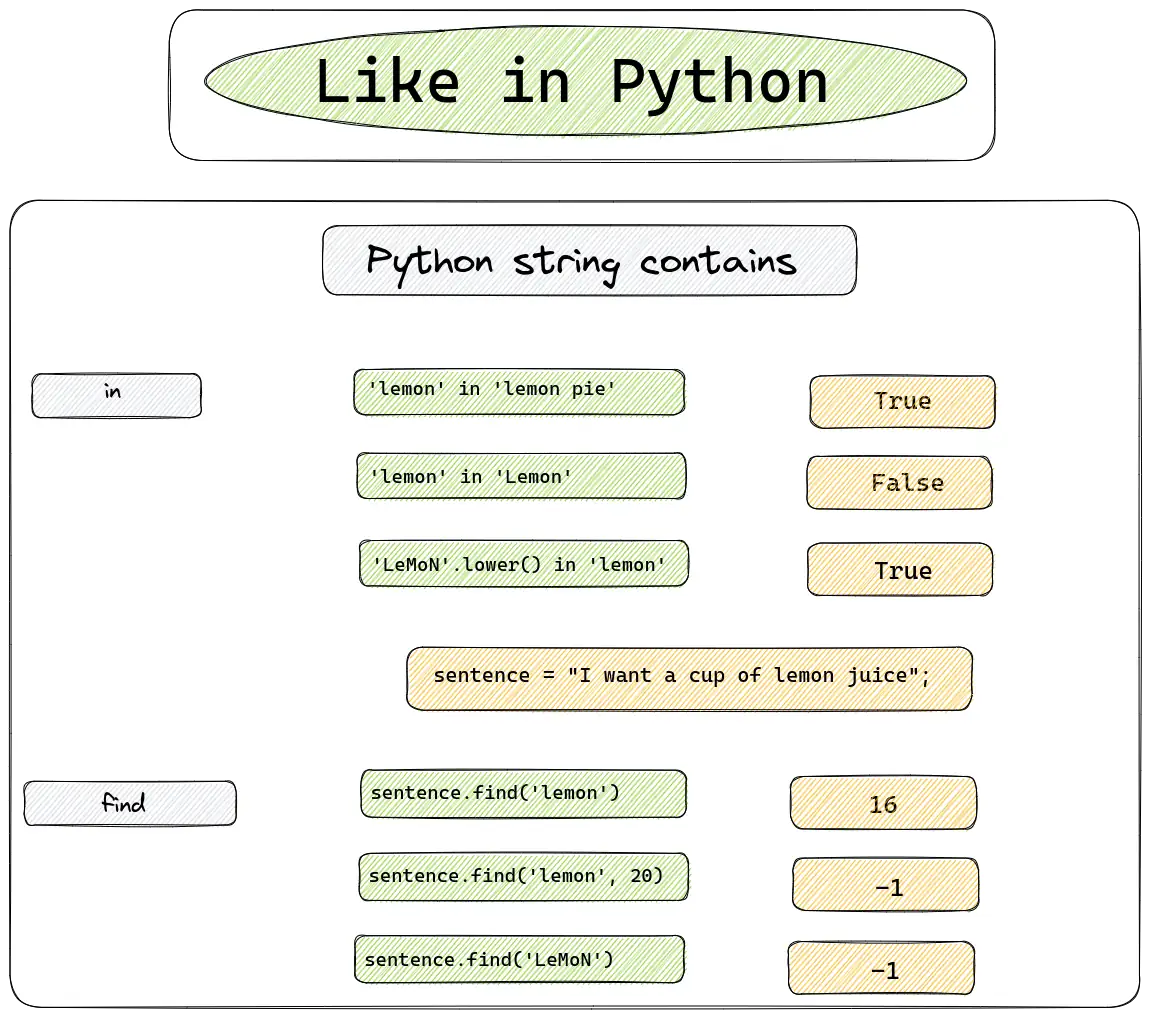
Table of Contents
- The
inoperator — Python's "like" - The
find()method — get the index - The
index()method — find or raise startswith()andendswith()— boundary checksremoveprefix()andremovesuffix()— Python 3.9+- Case-insensitive searching with
casefold() - Searching lists of strings
- Comparing two lists of strings
- Pattern matching with
re(regex) - Modern Python 3.12+ features
1. The in operator — Python's "like"
The in operator is Python's most readable way to check if a substring exists. It returns True or False.
'lemon' in 'lemon pie'      # True
'lemon' in 'Lemon'          # False  (case-sensitive!)
'LeMoN'.lower() in 'lemon'  # True
Case-insensitive comparison with casefold() (modern best practice)
For reliable case-insensitive matching, use casefold() instead of lower(). It handles more Unicode edge cases correctly.
text = "I love LEMONS from Türkiye"
search = "lemons"

print(search.casefold() in text.casefold())  # True
Why casefold() over lower()? casefold() is the Unicode-aware way to compare strings case-insensitively. It properly handles special characters like German ß (which becomes "ss") and is the recommended approach for any user-facing text comparison.
2. The find() method — get the index
str.find() returns the starting index of the first match, or -1 if not found.
sentence = "I want a cup of lemon juice"
test_word = "lemon"
test_word_up = "LEMON"

print(sentence.find(test_word))       # 16
print(sentence.find(test_word_up))    # -1  (case-sensitive)
print(sentence.find(test_word, 5))    # 16  (start search from index 5)
print(sentence.find(test_word, 20))   # -1  (not found after index 20)
The walrus operator := for efficient searching (Python 3.8+)
Combine search and check in one line:
sentence = "I want a cup of lemon juice"

if (pos := sentence.find("lemon")) != -1:
    print(f"Found at position {pos}")
else:
    print("Not found")
3. The index() method — find or raise
Similar to find(), but raises ValueError instead of returning -1 when the substring is not found.
sentence = "I want a cup of lemon juice"

print(sentence.index("lemon"))   # 16
print(sentence.index("orange"))  # ValueError: substring not found
Use index() when you expect the substring to exist and want to catch errors explicitly.
4. startswith() and endswith() — boundary checks
Check if a string begins or ends with a specific substring.
filename = "report_2026.pdf"

print(filename.startswith("report"))   # True
print(filename.endswith(".pdf"))       # True
print(filename.endswith((".pdf", ".docx")))  # True — tuple of suffixes
endswith() and startswith() accept a tuple of strings, making it easy to check multiple possibilities.
5. removeprefix() and removesuffix() — Python 3.9+
These methods safely remove known prefixes or suffixes without manual string slicing.
url = "https://example.com"
path = "document.txt"

print(url.removeprefix("https://"))   # "example.com"
print(path.removesuffix(".txt"))      # "document"
Unlike lstrip()/rstrip(), these only remove the exact string, not individual characters.
6. Case-insensitive searching with casefold()
When you need to find the position case-insensitively:
sentence = "I want a cup of LEMON juice"
search = "lemon"

# Find position with case-insensitive search
pos = sentence.casefold().find(search.casefold())
print(pos)  # 16
7. Searching lists of strings
Exact match in a list
forbidden_list = ['apple juice', 'banana pie', 'orange juice', 'lemon pie', 'lemon']
test_word = 'lemon'

if test_word in forbidden_list:
    print(test_word)  # lemon
Check if any list item contains a substring
forbidden_list = ['apple juice', 'banana pie', 'orange juice', 'lemon pie', 'lemon']
test_word = 'lemon'

# Using any() with a generator — modern Python idiom
matches = [word for word in forbidden_list if test_word in word]
print(matches)  # ['lemon pie', 'lemon']
Or using any() for a simple boolean check:
if any(test_word in word for word in forbidden_list):
    print("Found!")
Check if any list item starts with a substring
forbidden_list = ['apple juice', 'banana pie', 'orange juice', 'lemon pie', 'lemon']
test_word = 'lemon'

matches = [word for word in forbidden_list if word.startswith(test_word)]
print(matches)  # ['lemon pie', 'lemon']
8. Comparing two lists of strings
Filter one list against another using various match strategies.
Substring match (like SQL LIKE)
forbidden_list = ['apple', 'banana', 'orange', 'lemon', 'kiwi', 'mango']
search_words = ['apple', 'orange', 'lemon']

for test_word in search_words:
    if any(word.startswith(test_word) for word in forbidden_list):
        print(test_word)
Output:
apple
orange
lemon
Exact match using set intersection
forbidden_list = ['apple', 'banana', 'orange', 'lemon', 'kiwi', 'mango']
search_words = ['apple', 'orange', 'lemon']

diff_list = list(set(forbidden_list) & set(search_words))
print(diff_list)  # ['apple', 'orange', 'lemon'] (order may vary)
Note: Sets are unordered. Use
sorted()or list comprehension if order matters.
9. Pattern matching with re (regex)
For complex pattern matching beyond simple substring search, use Python's re module.
import re

text = "Contact us at [email protected] or [email protected]"

# Find all email addresses
emails = re.findall(r'\b[A-Za-z0-9._%+-]+@[A-Za-z0-9.-]+\.[A-Z|a-z]{2,}\b', text)
print(emails)  # ['[email protected]', '[email protected]']

# Case-insensitive search
if re.search(r'lemon', text, re.IGNORECASE):
    print("Found lemon (case-insensitive)")
re.search() vs re.match() vs re.fullmatch()
| Method | Behavior |
|---|---|
re.search() |
Searches anywhere in the string |
re.match() |
Matches only at the beginning |
re.fullmatch() |
Entire string must match the pattern |
10. Modern Python 3.12+ features
F-string debugging (PEP 701, Python 3.12)
Debug your string search results with inline f-string expressions:
sentence = "I want a cup of lemon juice"
pos = sentence.find("lemon")

print(f"{pos=}")           # pos=16
print(f"{sentence=}")      # sentence='I want a cup of lemon juice'
Type hints for string functions
Modern Python code should include type hints for clarity:
from typing import List

def find_matches(search_words: List[str], text_list: List[str]) -> List[str]:
    """Return all strings from text_list that contain any search word."""
    results = []
    for text in text_list:
        if any(word in text for word in search_words):
            results.append(text)
    return results

forbidden = ['apple juice', 'banana pie', 'lemon cake']
searches = ['lemon', 'apple']
print(find_matches(searches, forbidden))
# ['apple juice', 'lemon cake']
List filtering with modern comprehensions
forbidden_list = ['apple juice', 'banana pie', 'orange juice', 'lemon pie', 'lemon']
search_words = ['apple', 'banana', 'orange', 'lemon']

# Modern one-liner using nested comprehension
matches = [
    line for line in forbidden_list
    if any(word in line for word in search_words)
]
print(matches)  # ['apple juice', 'banana pie', 'orange juice', 'lemon pie', 'lemon']
Quick Reference: String Search Methods
| Method | Returns | Use When |
|---|---|---|
sub in string |
bool |
Simple existence check |
str.find(sub) |
int (or -1) |
Need the position |
str.index(sub) |
int (or raises) |
Expect match, want errors |
str.startswith(sub) |
bool |
Check beginning |
str.endswith(sub) |
bool |
Check ending |
str.removeprefix(p) |
str |
Strip known prefix (3.9+) |
str.removesuffix(s) |
str |
Strip known suffix (3.9+) |
str.casefold() |
str |
Case-insensitive comparison |
re.search(pattern, text) |
Match or None |
Complex pattern matching |
Summary
Python's string search capabilities have evolved from the basic in, find(), and startswith() methods to include modern tools like casefold() for proper Unicode comparison, removeprefix()/removesuffix() for clean string manipulation, and the re module for pattern matching. Combined with Python 3.12's f-string debugging and type hints, you now have a robust toolkit for any string-searching task.